Mostrar mensagens com a etiqueta MySQL. Mostrar todas as mensagens

terça-feira, 1 de abril de 2014

JAX-WS development with Maven+Embedded Tomcat+MySQL

Technology credits:
Apache Maven & Failsafe
Apache Tomcat


Disclosure

Before you start reading further: Keep in mind that this is a work in progress, and although i'm a "Systems&Informatics Engineer" i consider myself a novice programmer. If you have any question you don't see answered here, please leave your comment on the section below to help me improve this article.
Also, you should be aware that this post was a result of a lot of work. If you like it, please feel free to show your appreciation by offering me a cup of coffee through paypal and/or add value to this article by sharing your knowledge.

Today we will be picking up the previous "Simple Document/Wrapped SOAP JAX-WS WebServices Tutorial with Maven+Tomcat+Failsafe" project and we will add MySQL database access support.
You can start by downloading the project (if you haven't done so already) and run the 'clean verify' targets just to make sure everything is OK and ready to go.

Chosing the way to access the database

Before going into implementation details, we should be aware of our options to connect to a database.
The easiest way would be to hard-code your connection details in Java. This solution stores all the connection details (including username/password) and because of that you would end up with a solution that requires more time and effort to maintain as you would need to re-build and deploy the web application.
To build a web application in a portable and flexible way we should use external configuration files and libraries that allows us to connect to whatever database we would like.
Keeping that in mind, how do we configure/build/deploy/test our web application using Maven?

Configuring the Web Application

The best way to configure your webapp is through 'Resource Injection' using Annotations like @Resource. For example: This requires you to instruct Tomcat to initialize this class as you would do with any "listener-class" (even though this is not explicitly defined as a "listener-class"). To do that, add the following line to your web.xml: Listeners are called in order of appearance in the web.xml file, so, make sure you initialize the DBConnectionFactory before any other class that migth require a database connection.
If this method fails, you can still use the alternative style of looking into the JNDI configuration as stated in the mkyong blog: The code above allows you to initialize the DataSource object just once, just before your WebService class is instanciated for the first time.

Context Configuration

The above code trys to fetch whatever resource is defined under "java:comp/env/" named "mydb". This can already be defined in a production server using server.xml (for an all apps context configuration), but can also be defined as a "per app context configuration". To use the latter type of configuration, we need to add a META-INF folder in our webapp folder and add a context.xml to that folder like so:
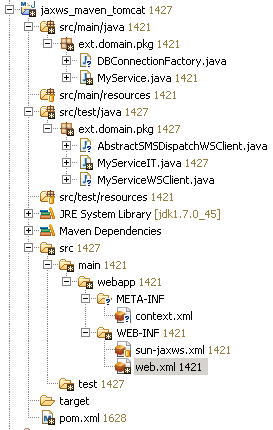
The context.xml file shall contain at least the following: This context.xml is for sample purposes only. Even for test purposes only you shall change the username and password to one that matches the same privileges that you use in a production environment. Also, on a production server you can add other parameters to the description of the resource such as DataSource parameters and container related configurations (such as autentication type) if you wish. It is also desirable to add your database name to the database connection URL, making your webapp even more portable.

Configuring the Maven build

And now for the trifecta we have to configure Maven to include the MySQL Connector/J library in the WAR file. Change your current Maven pom.xml and add the following to the dependencies configuration: Adding this dependency to the project will automatically add the required Connector/J library to the WAR built by Maven. Also remember that this way our webapp stays portable, meaning that it would be much easyer to change database provider by just adding/removing the required library inside the WAR and it's also easy to carry the WAR file from one container to another without having to pre-install other libraries in the host containers.

That's it! If you followed this post correctly you should now be able to get a Connection from the DataSource factory using: and start chatting with your database in the SQL language :)

Happy Coding!

sexta-feira, 22 de fevereiro de 2013

Deadlock

So, "What is a Deadlock?" you might ask. If you already know what a Deadlock is skip the next paragraph.

Imagine a bowl of soup with one spoon and two persons. Each person must hold the bowl and the spoon in order to eat the soup. One person grabs the bowl, the other person grabs the spoon. They both wait for each other for either the spoon or the bowl to take a "bite" on the soup. This situation represents a "Deadlock".

Earlier this week i've discovered a "Deadlock" situation on my MySQL 5.5.28 database. I've been noticing spurious "deadlocks" for a long time since the affected database became live. I've checked my software several times and i was certain that nothing i was doing could trigger a deadlock, not multithreading issues, not multiprocessing issues, not even multi-client issues since each client accessed exclusive ranges of data on the same table, so i thought how could this be?

After lots of research i've discovered a page that said that MySQL is not obliged to always return a result without a "deadlock" and that we should always "retry" to fetch the required information. Since i don't consider myself an expert in this area of expertise i decided to give it a go and developed a retry cycle to "attack" the deadlocking table.

After a month of normal operations on the live database another deadlock was found, this time in another table and on an insert operation. I went berzerk. How can this be? If the record does not exist on the database how can it be on deadlock!? If there is no record, no one else could be trying to access it!

I digged deeper on this second deadlock and discovered that the insert operation on that table had an "Insert Trigger" that requested an update operation on the previouly discovered deadlocking table (let's call it A). A forensic analysis to the MySQL database revealed that at the time of the Deadlock there was 2 clients trying to access Table A. Client 1 was accessing the table in a SELECT...FOR UPDATE and Client 2 in the INSERT operation to table B. Bear in mind that Client 1 is trying to select a range of data that is already mutually exclusive from the range of data that is going to be updated by the INSERT TRIGGER on Client 2, so conceptualy there are no reasons for deadlocking there.

So? What the hell is going on? I've read some foruns and here is my explanation:

  • The first SELECT from Client 1 on table A is selecting a range of data that will be discarded. I'm sorry oracle, but trying to lock rows that i don't need doesn't seem very efficient to begin with.
  • Although the INSERT operation on table B (that TRIGGERS an UPDATE on table A) is being executed as an atomic transaction the resources required for that transaction to happen are not being atomically requested, thus leaving a chance for this deadlock to happen.

Because of this two events Client 2 would hold a shared lock on Table A in order to INSERT on Table B while Client 1 would request the same row (to be rapidly discarded) on Table A which would then be needed by Client 2 to execute the UPDATE TRIGGER on Table A leaving the two requests on a deadlock.

What a mess!

I'm now using MySQL 5.5.30 and i didn't changed to 5.6.10 because that database version failed my system's database tests.

That is another mystery that i will try to solve. Stay tuned.

quarta-feira, 25 de janeiro de 2012

MySQL UDF Building using VS2008


Here's a little tutorial (no sound) on how to build MySQL UDF (User Defined Functions) using Visual Studio 2008. I used Roland Bouman's blog as a base for the video tutorial.